Claims Management Dashboard
The Claims Management dashboard is a key feature introduced as part of the new billing and claiming process under the Support at Home program. The dashboard will be useful during the upload of claim files to CareVision, providing users with tools to review validations, address discrepancies, and monitor the status of each claim before finalizing invoices and statements.
Access the Claims Management Dashboard
The Claims Management Dashboard is available in the portal under Dashboards > Claims Management in the left navigation pane. This dashboard allows you to review claim records and upload payment files for each claim.

Expand the Dashboard View

Claims Management Columns
The Claims Management dashboard displays the following columns:
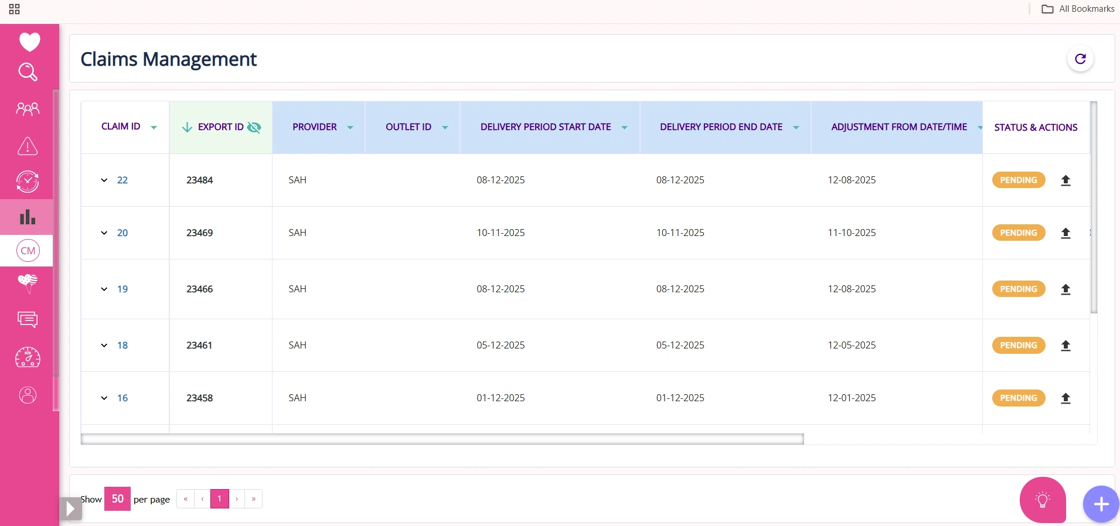
Column Name | Description |
Claim ID | Unique identifier for each claim. |
Export ID | Identifier for the export batch or file associated with the claim. You can expand or collapse the Export ID column by clicking the “eye” icon (which may be updated to an arrow in the future). This displays or hides additional columns for each claim. This feature is useful for organizations with many outlets, as it helps manage screen space and focus on relevant data. |
Provider | Name of the program related to the claim, such as SAH. |
Outlet ID | Identifier for the specific outlet or location of service. |
Delivery Period (Start/End) | The start and end dates for the period in which services were delivered. |
Adjustment Dates | Dates when any adjustments or corrections were made to the claim. |
Created By | Name of the person who created the claim entry. |
Created Date | Date when the claim was initially created in the system. |
Status and Actions | Allows you to perform tasks such as uploading payment files to attach government payment summaries to each claim. Completing these actions may trigger automatic status updates. |
Upload Payment Files
In the Status & Actions column, you can
- Upload Payment Files: Attach payment summary files received from the government to each claim.

- After uploading, the claim’s status should automatically update.

Claim ID
In the Claim ID column of the Claims Management dashboard, click any Claim ID to open detailed claim information in a new tab. The tab displays the following columns:
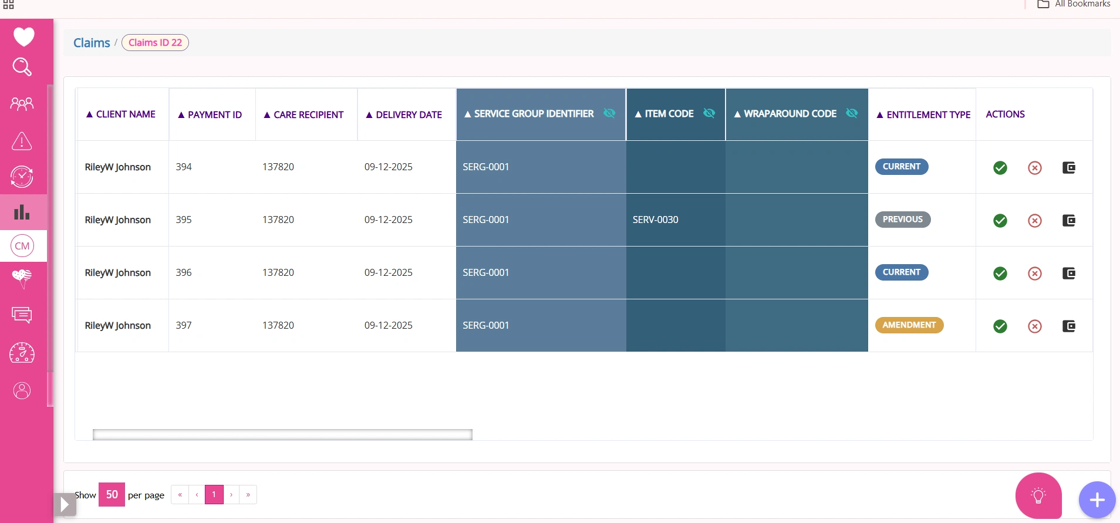
Column Name | Description |
ID | Unique identifier for the claim line item, used to reference specific billing entries. |
Client Name | Name of the individual receiving support at home services under the claim. |
Payment ID | Identifier for the payment transaction associated with the claim. |
Care Recipient ID | Unique identifier for the care recipient linked to the claim. |
Delivery Date | Date the service was delivered to the client. |
Service Group Identifier | Expandable/collapsible column; when expanded, displays Service Group, Service Type, Service Identifier, and Service Name, detailing the category and specifics of the provided service. |
Item Code | Expandable/collapsible column; when expanded, shows Item Description, Line Item Description, and CV Service Name, providing further detail on the billed item. |
Wrap Around Code | Code indicating additional or wraparound services included in the claim. |
Wraparound Description | Description of the wraparound service or support provided. |
Entitlement Type | Specifies whether the entitlement is Current, Previous, or an Amendment for the claim. |
Rate | The rate applied for the service or item billed. |
Quantity | Number of service units or items billed for the claim. |
Unit | The unit of measure for the billed service or item (e.g., hours, visits). |
Invoice Amount | Total amount invoiced for the claim line. |
Compensation Reduction | Expandable/collapsible; when expanded, includes Compensation Reduction Variance and Compensation Reduction Final, showing adjustments to compensation. |
Individual Contribution | Expandable/collapsible; when expanded, displays Individual Contribution Variance and Individual Contribution Final, indicating the client’s financial contribution. |
Fee Reduction | Expandable/collapsible; when expanded, shows Fee Reduction Variance and Fee Reduction Final, reflecting any fee adjustments. |
Reduction Type | Expandable/collapsible; when expanded, includes Reduction Type Variance and Reduction Type Final, specifying the nature and final status of reductions. |
Payment Determination | Expandable/collapsible; when expanded, shows Payment Determination Variance and Payment Determination Final), outlining how payment was determined and finalized. |
Budget Type | Expandable/collapsible; when expanded, displays Budget Type Variance and Budget Type Final, providing details on any changes and the finalized budget type used for the claim. |
Budget Drawn Down | Expandable/collapsible; when expanded, shows Budget Drawn Down Variance and Budget Drawn Down Final, indicating adjustments and the final amount of budget utilized for the claim. |
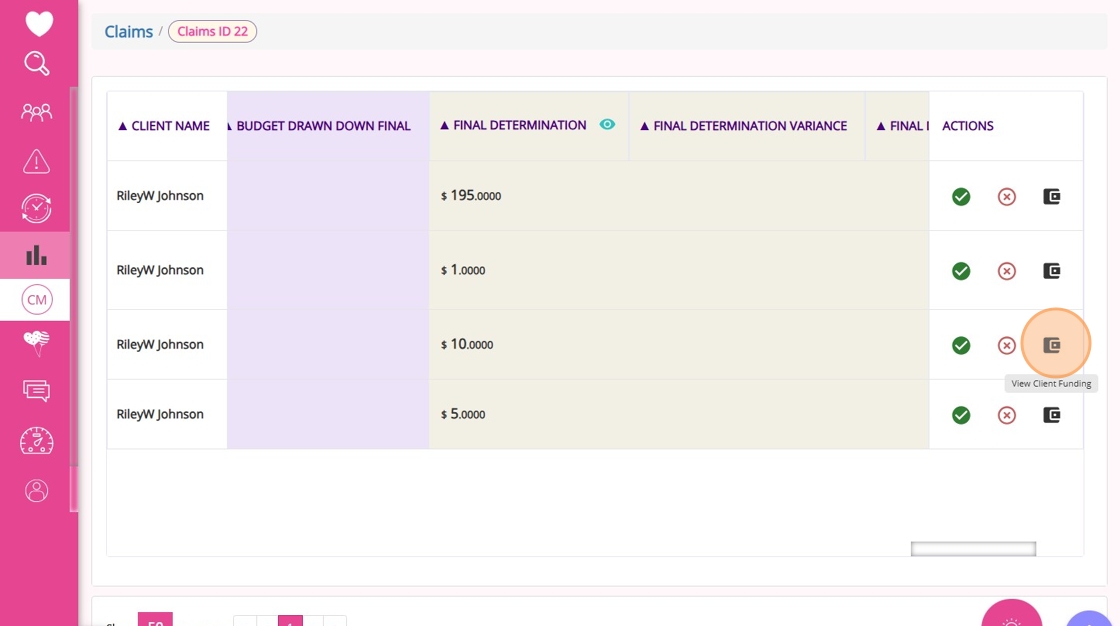
Final Determination | Expandable/collapsible; when expanded, includes Final Determination Variance and Final Determination Final, summarizing any differences and the final payment decision for the claim. |
Allocation Category Code | Code representing the funding allocation category for the claim. |
Actions | Options to accept, dispute, or view client funding for the claim line. |
Accept or Dispute Claims
- If you click the Accept icon under Actions in the Claims ID tab, you specify that you agree with the government’s assessment of the claim. If you finish a claim without clicking accept or dispute, the system will automatically accept the government’s assessment. Before the acceptance is processed, you will see a message asking if you want to continue.

- If you click the Dispute icon under Actions, you specify that you do not agree with the government’s assessment of the claim and instead choose CareVision’s interpretation. Before this takes effect, you will see a message asking if you want to continue.

- If you click the View Client Funding icon under Actions, a new tab will open with the client’s profile for more details. This feature is currently in development.
Refreshing Claim Data
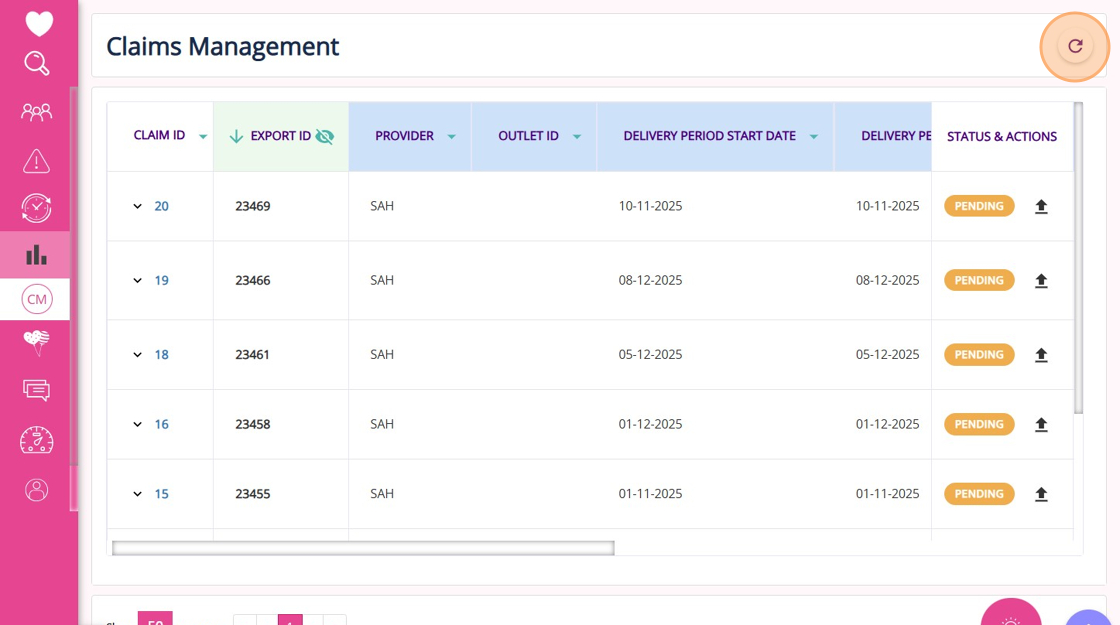
Use the Refresh button at the top of the dashboard to update and view the latest claim information.
Filtering, Sorting, and Pagination
Sorting is available but currently only applies to data displayed on the current page.
Pagination defaults to 50 items per page.
Integration with Claiming Workflow
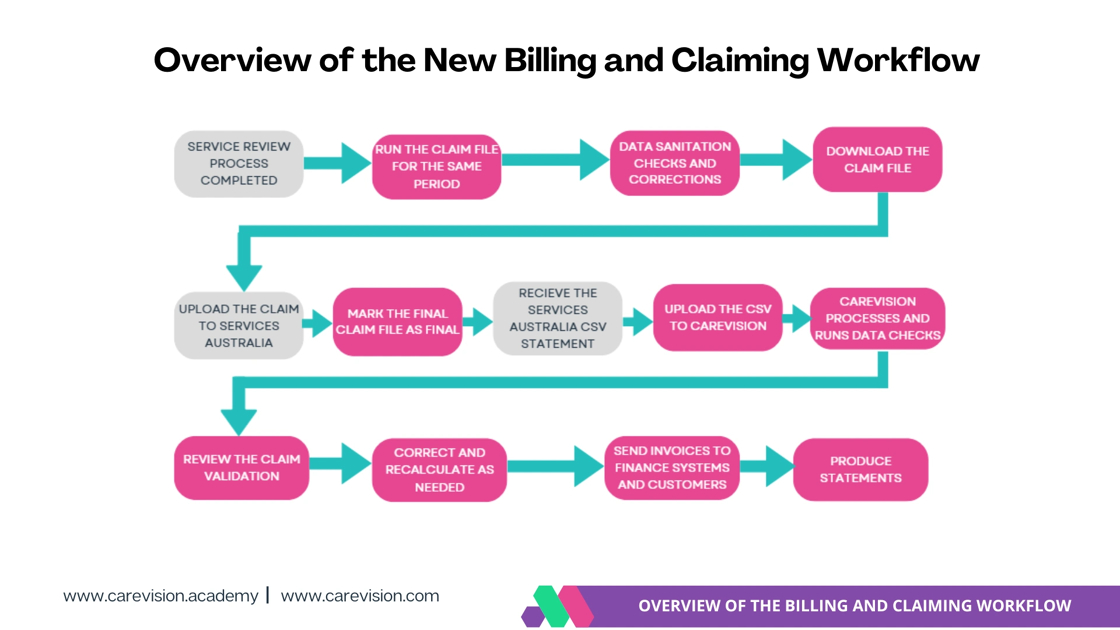
- Uploading claim and payment files
- Reviewing government payment summaries and variances
- Finalizing claims (Note: there is currently no rollback if a claim is marked as final by mistake)
- Generating client invoices
- Direct links to client profiles (in progress)
- Clear action flows to help organizations adapt to new SAH invoicing requirements after payment summaries, reducing errors and streamlining financial operations
Upcoming Features
- Ability to roll back or delete claims marked as final
- Support for adding notes to claims
- Improved visibility for key columns, such as client name and CareVision service name
- Expanded download and export options
- Enhanced filtering and sorting for large datasets
This topic explained how to navigate and use the Claims Management dashboard for the Support at Home billing and claiming process, including uploading claim files, reviewing government payment summaries, and managing claim actions such as accept or dispute.
For more information about the Claims Management dashboard, contact the CareVision Support Team.
Related Articles
Support at Home Billing and Claiming Workflow
The Support at Home billing and claiming workflow in CareVision guides you through reviewing services, generating and checking your claim file, and submitting it to Services Australia. After you receive the Services Australia CSV payment statement, ...Support at Home Q&A
This document compiles questions submitted by participants in the Q&A box during Support at Home Training Sessions and provides corresponding answers. For each training session, click the topic to expand. Questions and answers are organised under ...How to Requote Clients for the Support at Home Transition
As Support at Home (SAH) launches on November 1, clients may experience changes to their funding and care arrangements. You may need to transition existing Home Care Packages (HCP) clients to the new program or assist new clients as they receive ...Quoting for Support at Home Clients in Advanced Mode
With the introduction of the Support at Home (SAH) program, CareVision has launched an Advanced Mode to meet new quoting requirements. Compared to Basic, Advanced Mode provides enhanced features such as budget tracking, live budget updates, and the ...Manage Transport Services for Support at Home
This topic describes how to configure and manage transport services for Support at Home. It explains how to correctly set up and link billing categories, services, and funding source templates to support a smooth quoting and export process. Keywords: ...