FAQ: What happens if a sleepover shift has the same start and end time — or no active time at all?

FAQ: What happens if a sleepover shift has the same start and end time — or no active time at all?

QuestionWhat happens if a sleepover shift has the same start and end time — or no active time at all?
Answer: The system handles both scenarios correctly:

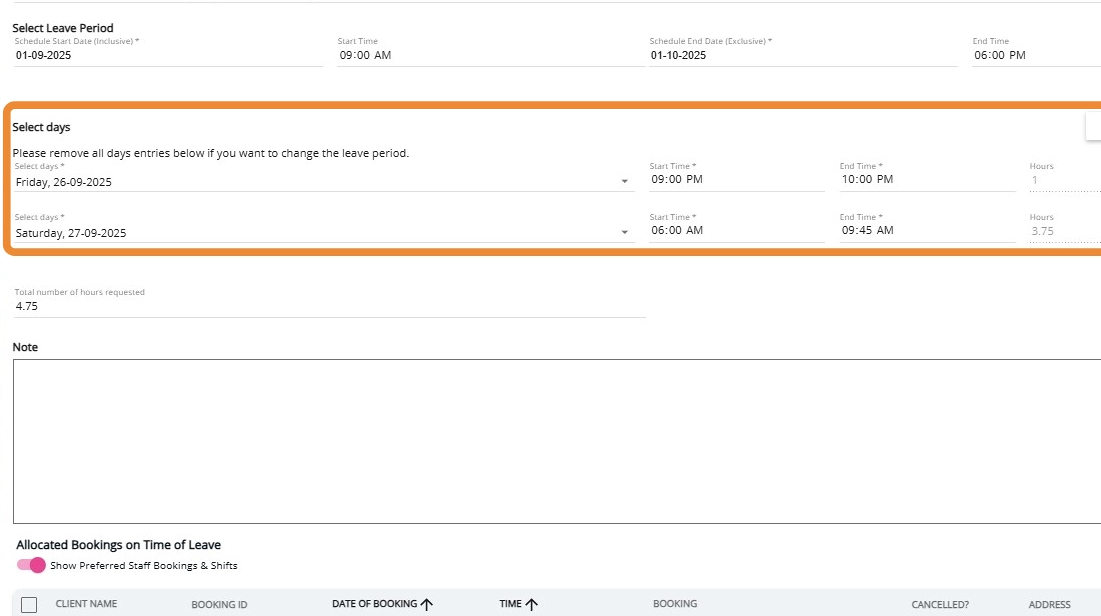
1. Sleepover with active time before and after sleep:
 The leave application shows two active time blocks (evening and morning), with a gap for the sleep period. Only the active portions are included in leave. 


2. 100% sleepover shift (no active time, e.g. 11:00 pm – 7:00 am):
 When added to the leave application, the system records the start and end times but applies 0 hours duration, because there is no active work during the shift.
In both cases, the leave application reflects the correct hours based on how the shift data is recorded.

Both scenarios represent expected and correct system behaviour:
  • Active time is included in leave.
  • Sleepover-only time is excluded.
  • Shifts with no active time correctly result in zero leave hours.

This ensures leave is calculated accurately and consistently based on the underlying booking data.

    • Related Articles

    • FAQ: How does leave work for sleepover shifts that include active time?
      Question: How does leave work for sleepover shifts that include active time? Answer: When a sleepover shift includes active work before and/or after the sleep period, the system automatically separates these active portions and excludes the standard ...
    • FAQ: How to Install CareVision Mobile App?

      Apple (iOS) Click the Apple store Search for the ‘CareVision Plus' and click ‘Install/Get’ Open the app and input your credentials Android Open ‘Playstore’ Search for ‘Care Vision Plus’ and Click the Install button Open the app and log-in using your ...
    • FAQ: How do I add in the system if the amount being billed and paid are different?

      Question: I have a 6 hour service booking that has been provided. However, part of the amount will be waived as the client does not have sufficient amount in the funding; whereas the staff member will be paid for the entire shift (6 hours). How can I ...
    • FAQ: Validate button in Scheduling page, how does it work?

      Overview The Validate button calculates the total working hours of a Field Care Professional based on their Pay Period. This allow administrators to see how many hours a staff member has worked and will work for a certain pay period, enabling them to ...
    • FAQ: Can the Site Admin manually checks in for the field care staff?

      Question: Can the Site Admin manually checks in for the field care staff that forgets to check in on the CareVision application? The system does not enable the Site Administrators to check in on behalf of the field care staff, however there are other ...

    Request an Article or Guide

    We are keen to know what you want to know more about? Let us know on chat or raise a ticket for an article or topic you would like covered in more detail. We have a team of technical writers and learning content creators keen for your suggestions.