Carevision Reference Codes Table

Carevision Reference Codes Table

Reference codes play an important role in how CareVision organizes and processes information for billing, payroll, and reporting. Understanding these codes supports accurate mapping and integration across different parts of the system.

This topic lists the Reference Codes in CareVision.

Keywords: reference codes, ref, billing category, carevision api, payroll integration, invoice references, service type id, income account, cost account, funding source, techone refcodes, employment hero refcodes, chsp refcodes, ndis refcodes, refcodes, sah, sah ref codes

I. What are Reference Codes?

Reference codes are unique identifiers that map, categorize, or link elements within the system at the organisation, funding source, and billing category levels for billing, payroll, and reporting. Reference codes help integrate CareVision with external systems and keep financial and operational processes consistent.

II. Reference Codes Table

Carevision Reference Codes Table
IndexReferenceNameDescriptionPurposeNotes
0
Ref 1
refOne
Income Account
Activity ID (MYOB Activity Slip & MYOB Time Billing)
If left blank, this will default to the Billing Category’s Organisation Reference.

Epicor = Part Number
Xero = Account Code
MYOB = Activity ID
credit_account
1
Ref 2
refTwo
Cost Account
Cost Centre (Payroll Metrics)
CostCode
Payroll Category (MYOB Activity Slip & MYOB Payroll)
2
Ref 3
refThree
Service Type ID (CHSP)
DEX ID
service type id
3
Ref 4
refFour
Support Number (NDIS)
claimid
Added to the “Note” field, along with description, time, and adjustment status. (MYOB Time Billing)
4Ref 5refFiveCaseId (QCSS)CaseId (QCSS)QCSS-OMS → CaseId
5
Ref 6
refSix
Claim Type (NDIS)
Claim Type (NDIS)
ndis code
claim type
6Ref 7refSevenType of chargeType of charge
7Ref 8refEightJobJob (MYOB Time Billing & MYOB Payroll)Debit_Ledger_code
8Ref 9refNineCREDIT_LEDGER_CODECREDIT_LEDGER_CODE
9Ref 10refTenCREDIT_ACCOUNTCREDIT_ACCOUNT
10Ref 11refElevenROLEROLE
11
Ref 12
refTwelve
SERVICE TYPE
SERVICE TYPE
WIC CODE
12Ref 13refThirteenTerritory IDTerritory ID - used on Epicor Clients ExportDEPT
13Ref 14refFourteenRate IndicatorUsed to indicate which rate was applied, particularly for Time Category Billing Categories (e.g., “PH”, “WEEKDAY”).
14
Ref 15
refFifteen
Pay Element / Sleepover Description
Sleepover Billing Category, Sleepover Category - Sleepover Description (Payroll Metrics)
Sleepover Billing Category, Interruptions - Pay Element (Payroll Metrics)
Travel With Client Billing Category - Pay Element (Payroll Metrics)
Callout Distance Billing Category - Pay Element (Payroll Metrics)
Pay Item EarningsRateID (XERO Payroll)
15
Ref 16
refSixteen
HACC Category
HACC export
16
Ref 17
refSeventeen
Income Code Prefix
(Upcoming) Added before the Income Account, useful for Natural Accounts.
17
Ref 18
refEighteen
Cost Centre Prefix
(Upcoming) Added before the Cost Centre
18
Ref 19
refNineteen
Internal Payglobal ReasonCodes
(L.MEETINGS, L.TRAINING)
19
Ref 20
refTwenty
Payroll time type code
Aurion
20
Ref 21
refTwentyOne
Public Holiday Not Worked Code
Aurion
If this field is blank, PHNW will be used as the default.
21
Ref 22
refTwentyTwo
Work type external ID
KeyPay payroll Export. Value for “Work type external ID” column for “Not a broken shift” Transaction type
22
Ref 23
refTwentyThree
Default org travel mileage reference
Keypay Component
Replaces the hardcoded default value of 3643
23
Ref 24
refTwentyFour
Work type external ID (time-based output)
KeyPayComponent
Added a default value for standard time-based output instead of blank
24Ref 25refTwentyFiveService TypeFor SAH billing and claiming purposes
25Ref 26refTwentySixService TypeFor SAH billing and claiming purposes
26
Ref 27
refTwentySeven
TechOneAR Invoice Value
Value for TechOneAR Invoice
The value entered here will be included in each client header row.
LLDGCODE column
27Ref 28refTwentyEightSAH Health Professional Type (HPT) Item CodesFor SAH billing and claiming purposes
28Ref 29refTwentyNineAT-HM Business Item IDFor SAH billing and claiming purposes
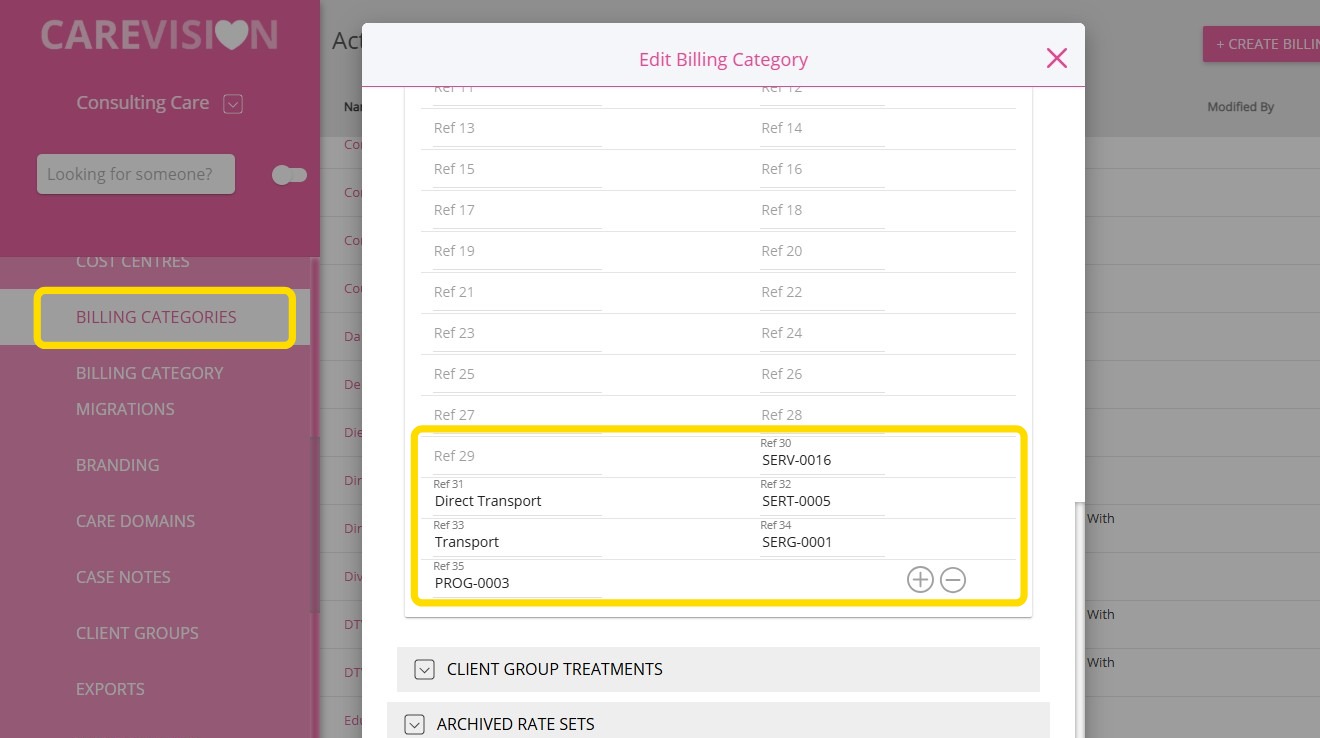
29Ref 30refThirtyCorresponds to the SAH Business Service ID (Column H) in file; enter SERV-0016 as the value.For SAH billing and claiming purposes
30Ref 31refThirtyOneCorresponds to the SAH Service Name (Column G) in file; enter Direct Transport as the value.For SAH billing and claiming purposes
31Ref 32refThirtyTwoCorresponds to the SAH Business Service Type ID (Column F) in file; enter SERT-0005 as the value.For SAH billing and claiming purposes
32Ref 33refThirtyThreeCorresponds to the SAH Service Type Name (Column E) in file; enter Transport as the value.For SAH billing and claiming purposes
33Ref 34refThirtyFourCorresponds to the SAH Service Group/Service Group ID (Column B) in file; enter SERG-0001 as the value.For SAH billing and claiming purposes
34Ref 35refThirtyFiveCorresponds to the SAH Program/Program ID (Column A) in file; enter PROG-0003 as the value.For SAH billing and claiming purposes

III. Sources of Reference Codes in CareVision
Reference codes in CareVision come from three main sources:

1. Organisation Reference Codes

These are set up on the Settings > General Configuration page in the web portal.
 

2. Funding Source Reference Codes

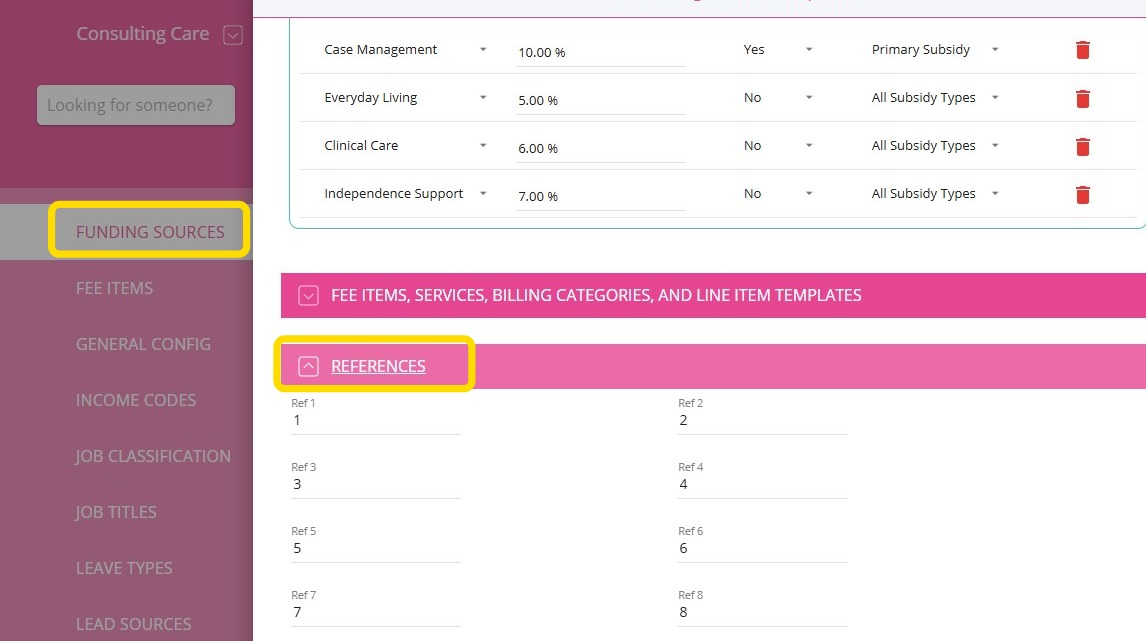
You can set up reference codes on the Funding Sources > Funding Template > References section. These codes are created within funding source templates and are copied to client funding records when those records are established. After copying, updates to the original template do not affect existing records, which maintains consistency for each client.
3. Line-Item Reference Codes (Billing Category Reference Codes)

You can set up reference codes at the billing category level by navigating to Billing Categories, selecting a billing category, and adding reference codes when editing the rate set. Line-item reference codes are used similarly to how rates are retrieved when calculating a line item. The process for retrieving and applying these references during calculations is the same as for rate retrieval.
IV. Merging Reference Codes

When generating invoices and payroll, reference codes are created by combining values from the organisation, funding source, and billing category references described above.
Income & Cost Codes
In CareVision, we recommend setting up Income and Cost Codes correctly to prevent them from being flagged during the Service Review process. Proper mapping is also required to ensure smooth processing of payroll and invoicing.
Notes
This would depend on your Chart of Accounts structure.

Income Code:
[Branch/Organisation Ref17] + [Funding Source Template Ref17] + [Billing Category Ref17] + [Branch/Organisation Ref1] + [Funding Source Template Ref1] + [Billing Category Ref1]

Cost Code:
[Branch/Organisation Ref18] + [Funding Source Template Ref18] + [Billing Category Ref18] + [Branch/Organisation Ref2] + [Funding Source Template Ref2] + [Billing Category Ref2]
Notes
If a specific reference code is not set up (for example, if the Cost Code does not include Funding Source Template Ref18), the system will still allow processing as long as:
  • The Income Code includes Billing Category Ref1
  • The Cost Code includes Billing Category Ref2

V. Override Rules for Ref 15 and Ref 24

Values for Ref 15 (Pay Element / Sleepover Description) and Ref 24 (Work type external ID) can be configured at both the organisation level and the billing category level.
  • Organisation Level:
    The value entered at the organisation level for Ref 15 and Ref 24 applies to all bookings and/or shifts..
  • Billing Category Level (Override):
    If a specific billing category requires a different value, you can enter a separate value at the billing category level for Ref 15 and Ref 24. The billing category-level value will override the organisation-level value for that category. If no override is set at the billing category level, the organisation-level value will be applied by default.

This topic explained the Reference Codes in CareVision. For more information about Reference Codes and Billing Categories, contact the CareVision Support Team.
    • Related Articles

    • Guide to Updating CHSP Billing Categories

      Keeping your billing categories up to date helps ensure your records stay accurate and your processes run smoothly. This document describes how to update CHSP billing categories in order to update the service type ID. Keywords: chsp, billing, ...
    • Sleepover Billing & Payroll

      Overview CareVision provides support for scheduling, tracking, billing, and paying sleepover bookings. A sleepover booking is a booking during which the staff member may sleep when they are not working. Key terminology / concepts Sleep Period - The ...
    • How to Process Taxi Vouchers for Home Care Packages vs DEX CHSP Programs

      In some cases, additional expenses such as special supplies, purchases, or specific service fees must be added to a client’s billing record. These expenses are documented as manual entries within the billing system. Taxi Vouchers, which are provided ...
    • Billing Process: Step-by-Step Guide

      Billing involves invoicing clients or their plan managers for services provided. Keeping client information up to date is important to make sure the billing process is accurate and meets all requirements. This documentation guides you through the ...
    • NDIS Price Changes

      The National Disability Insurance Scheme (NDIS) has released updated Pricing Arrangements and Price Limits, effective 1 July 2025. Keywords: ndis, price changes, support coordination, recovery coaching, therapy supports, travel claims, plan ...

    Request an Article or Guide

    We are keen to know what you want to know more about? Let us know on chat or raise a ticket for an article or topic you would like covered in more detail. We have a team of technical writers and learning content creators keen for your suggestions.