Handling Claims with Underpayment (With Co-Contribution)

Handling Claims with Underpayment (With Co-Contribution)

The system handles claims where the payment is less than the claimed amount and a co-contribution applies.

QuestionAnswer
How does CareVision handle scenarios where Services Australia returns a claim with a payment less than the claimed amount and a co-contribution applies?CareVision uses the total amounts returned by Services Australia (both government payment and co-contribution) as the values reflected in the invoice and statement.

Any difference from the original claimed amount is recorded as a variance. The Quantity column in the invoice is recalculated to represent the service hours corresponding to each payment component.

Example
You deliver a service for 2 hours at $16.58 per hour, totalling $33.16 in the SAH Claim File (CareVision).
In the SAH Payment Statement Summary (Services Australia), the payment is recorded as:
  1. Budget Drawdown: $30.00
  2. Co-Contribution: $5.00
(Variance of $3.16)

How It Appears in the Claims Management Dashboard
After uploading the SAH Payment Statement Summary (Services Australia) to CareVision, the dashboard shows:
Reconciliation Status: Accepted

How It Appears in the Invoice
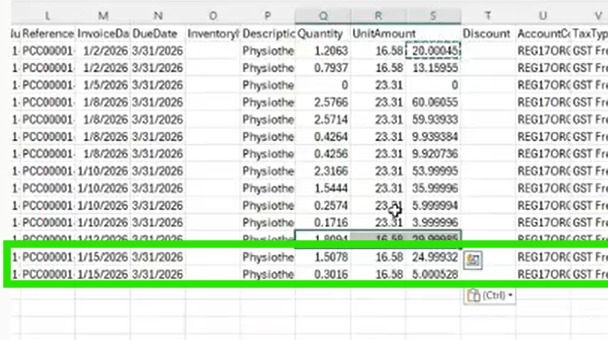
The payment is shown as two rows:
1.5078 hours x $16.58 = $25.00
0.3016 hours x $16.58 = $5.00
Notes
Note: Calculated values in the Invoice may display up to 5 decimal places. These values are rounded up to 2 decimal places in the SAH Monthly Statement File.
How It Appears in the SAH Monthly Statement File
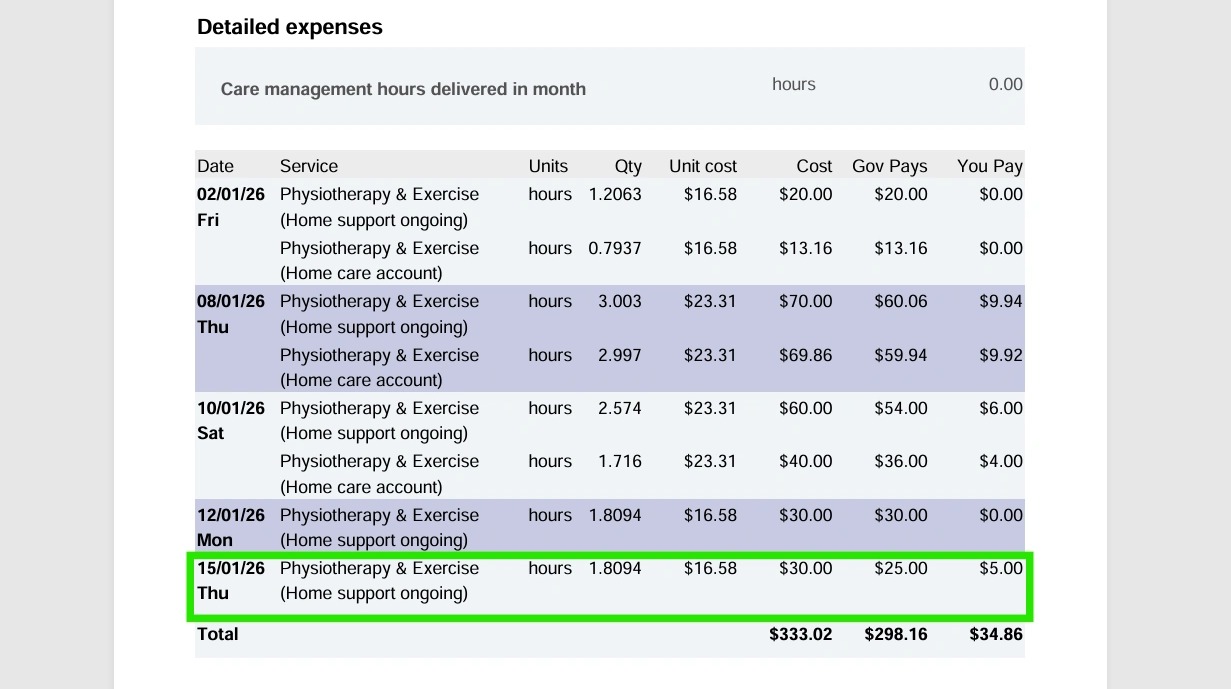
The statement shows the same amount as the invoice:
1.8094 hours x $16.58 = $30.00
  1. Govt Pay = $25.00
  2. You Pay = $5.00
    • Related Articles

    • Handling Claims with Underpayment (No Co-Contribution)

      The system handles claims where the payment is less than the claimed amount and no co-contribution applies. Question Answer How does CareVision handle scenarios where Services Australia returns a claim with a payment less than the claimed amount and ...
    • Handling Claims with Multiple Budget Allocations and Contributions

      Scenario A. Multiple Budget Allocations (No Co-contribution) Question Answer How does CareVision handle scenarios where Services Australia returns a claim split across multiple funding categories? CareVision accepts the total amount from the SAH ...
    • Handling Negative Claim Adjustments from Service Cancellations

      This scenario occurs when services that were previously scheduled or already claimed are later cancelled. These changes create adjustment transactions (credits), which appear as negative line items in the SAH Claim File generated from CareVision. Why ...
    • FAQ: How to Install CareVision Mobile App?

      Apple (iOS) Click the Apple store Search for the ‘CareVision Plus' and click ‘Install/Get’ Open the app and input your credentials Android Open ‘Playstore’ Search for ‘Care Vision Plus’ and Click the Install button Open the app and log-in using your ...
    • How to Create Quotes with Call-Out Distance Fee

      Prerequisites Set up a Callout Fee Billing Category Set up a Callout Fee Billing Category 1. In the left navigation pane, go to Settings > Billing Categories. 2. Make sure you have a billing category with the Type set to Callout Distance. In this ...

    Request an Article or Guide

    We are keen to know what you want to know more about? Let us know on chat or raise a ticket for an article or topic you would like covered in more detail. We have a team of technical writers and learning content creators keen for your suggestions.