Forecast Cost Tracking
This topic introduces Forecast Cost Tracking, providing clear visibility of Planned, Confirmed, and Claimed values directly on bookings.
Keywords: forecast cost, booking values, planned confirmed claimed, budget tracking, carevision bookings, allocation tracking, scheduling costs, booking forecast, funding allocation, travel estimates
Key Terminology
I. What the feature is
Forecast Cost Tracking enhances how bookings are tracked financially by displaying estimated and actual values directly on each booking. It connects the workflow from budget and allocation through booking and claim, allowing you to clearly track expected, committed, and actual spend.
II. Who it’s for
- Rostering and scheduling teams
- Finance and operations teams
- Users managing client budgets, allocations, and claims
III. How it works
Forecast Cost Tracking follows the end-to-end workflow from quote and budget setup through to booking and claim.
A. Quote and Budget Setup
In Quotes, under the Funding Service Program Allocations section, budgets are defined using several components, such as Budget for Services (funding constraints) and Allocations (planned amounts based on intended services). Once the quote is Accepted, these values are stored on the client profile and determine the expected spend across allocations.
B. Bookings
Bookings are created from care plans or manually, with each booking representing planned service delivery.
C. Forecast Cost Calculation
Forecast Cost is calculated when:
- bookings are preloaded
- bookings are published
- bookings are claimed
- bookings are modified
Each update recalculates and stores the latest value on the booking.
D. Status-Based Values
Forecast Cost values are visible across bookings and calendars, including the Client Calendar, Client Service Orders, Staff Calendar, Service Requests, Service Review, Teams V1 and V2, and Social Group views (calendar and manage attendance).
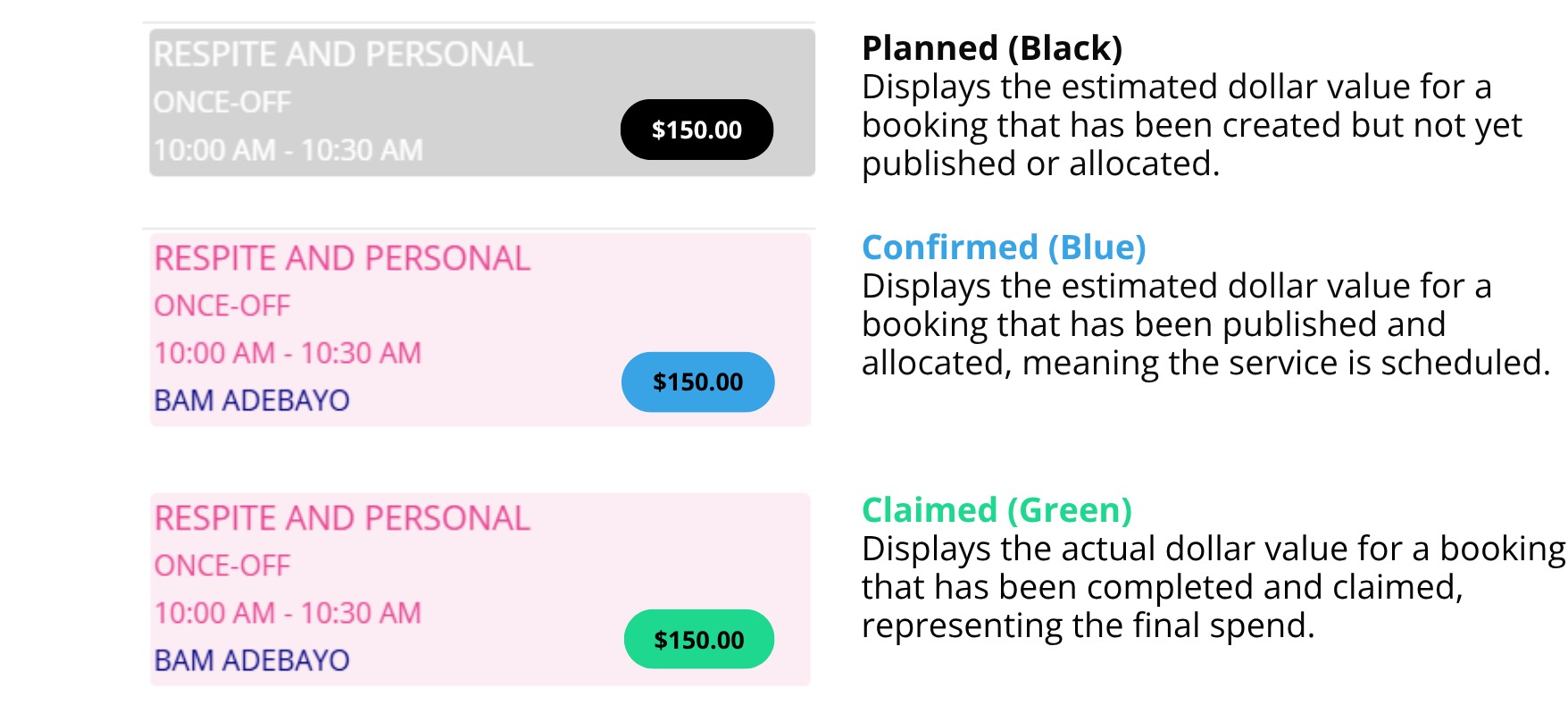
- Planned (Black)
- Confirmed (Blue)
- Claimed (Green) - Note: This is not yet supported and will be available soon.
Sample forecast cost values displayed in the calendar
E. Budget Tracking
Forecast values roll up across:
- booking level
- allocation level
- funding periods (for example, quarterly)
This gives you a full view of planned, confirmed, and claimed spend.
IV. Limitations
A. $0.00 Forecast Cost
Some bookings may temporarily show a forecast cost of $0.00 after the feature is released. This will be updated automatically in the coming days after release.
B. Billing Rate Changes
If billing rates change, existing bookings do not automatically update. Forecast Cost updates the next time the booking is modified or processed.
C. Stored Calculations
Forecast Cost is stored, not calculated on demand. Values update only when a booking is created, modified, confirmed, or claimed.
This topic explained Forecast Cost Tracking, including how Planned, Confirmed, and Claimed values are calculated and displayed. For more information about Forecast Cost Tracking, contact the CareVision Support Team.